Undhuh app
educalingo
Golèki

Tegesé saka "command key" ing bausastra Basa Inggris

Bausastra
BAUSASTRA
section

PANGOCAP SAKA COMMAND KEY ING BASA INGGRIS

command key  [kəˈmɑːnd kiː] play
facebooktwitterpinterestwhatsapp

GOLONGAN PARAMASASTRA SAKA COMMAND KEY

tembung aran
tembung sipat
tembung kriya
tembung katrangan
tembung ganti
preposition
panyambung
panemtu
seru

APA TEGESÉ COMMAND KEY ING BASA INGGRIS?

Klik kanggo deleng deifinisi asli saka «command key» ing bausastra Basa Inggris.
Klik kanggo deleng pertalan otomatis saka definisi ing Basa Jawa.
command key

Tombol Command

Command key

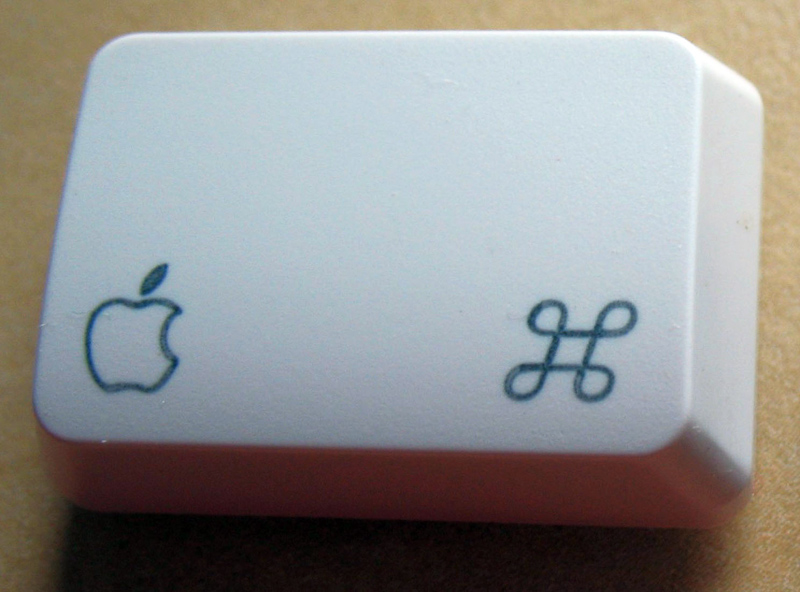
Tombol Command, uga historis sing dikenal minangka tombol Apple, tombol mbukak-Apple, tombol pretzel, tombol squiggly, utawa tombol meta, minangka kunci modifier ing Apple Keyboards. Tujuan tombol Command yaiku kanggo ngidini pangguna kanggo ngetik perintah pintas keyboard menyang aplikasi GUI. Keyboard "lengkap" Macintosh-jinis paling umum-nduweni rong tombol printah, siji ing saben sisih spasi; sawetara papan kompak duwe siji ing sisih kiwa. Simbol "⌘" dipilih sasampunipun Steve Jobs mutusaken bilih panggunaan logo Apple ing sistem menu punika langkung saged dipunginakaken. Adaptasi Apple saka simbol-encoded ing Unicode ing U + 2318 ⌘-wis ditemokake minangka bagean saka panggunaan ing negara-negara Skandinavia kanggo nduding panggonan sing dipengini. Simbol kasebut dikenal kanthi jeneng maneka warna, kalebu "Saint John's Arms" lan "Bowen knot". The Command key, also historically known as the Apple key, open-Apple key, pretzel key, squiggly button, or meta key, is a modifier key present on Apple Keyboards. The Command key's purpose is to allow the user to enter keyboard shortcut commands to GUI applications. An "extended" Macintosh keyboard—the most common type—has two command keys, one on each side of the space bar; some compact keyboards have one only on the left. The “⌘” symbol was chosen after Steve Jobs decided that the use of the Apple logo in the menu system would be an over-use of the logo. Apple's adaptation of the symbol—encoded in Unicode at U+2318 ⌘ —was derived in part from its use in Scandinavian countries to denote places of interest. The symbol is known by various other names, including “Saint John's Arms” and “Bowen knot”.

Definisi saka command key ing bausastra Basa Inggris

Définisi tombol printah ing kamus iku kunci sing digunakake nalika ngeksekusi perintah.

The definition of command key in the dictionary is a key used when executing commands.

Klik kanggo deleng deifinisi asli saka «command key» ing bausastra Basa Inggris.
Klik kanggo deleng pertalan otomatis saka definisi ing Basa Jawa.

TEMBUNG BASA INGGRIS KANG KALARAS PADHA KARO COMMAND KEY


ackee
ˈækiː
ake
ˈɑːkiː
apres-ski
ˌæpreɪˈskiː
ASCII
ˈæskiː
Baisakhi
baɪˈsækiː
Cherokee
ˈtʃɛrəˌkiː
croquis
krɒˈkiː
jet-ski
dʒet skiː
key
kiː
marquee
mɑːˈkiː
Milwaukee
mɪlˈwɔːkiː
Nike
ˈnaɪkiː
quay
kiː
raki
rɑːˈkiː
Sikorski
sɪˈkɔːskiː
ski
skiː
Taranaki
ˌtærəˈnækiː
Torquay
ˌtɔːˈkiː
turnkey
ˈtɜːnˌkiː
Waikiki
ˈwaɪkɪˌkiː

TEMBUNG BASA INGGRIS KANG AWIT KAYA COMMAND KEY

command
command and control
command economy
command guidance
command language
command line
command module
command paper
command performance
command post
commandable
commandant
commandantship
commandeer
commander
commander in chief
commander-in-chief
commanders in chief
commandership
commandery

TEMBUNG BASA INGGRIS KANG WUSANANÉ KAYA COMMAND KEY

Allen key
control key
dead key
dichotomous key
escape key
function key
hot key
ignition key
major key
master key
minor key
off key
on key
return key
shift key
skeleton key
tab key
USB key
user-defined key
Woodruff key

Dasanama lan kosok bali saka command key ing bausastra dasanama Basa Inggris

DASANAMA

Pertalan saka «command key» menyang 25 basa

PAMERTAL
online translator

PERTALAN SAKA COMMAND KEY

Weruhi pertalan saka command key menyang 25 basa nganggo Basa Inggris pamertal multi basa kita.
pertalan saka command key saka Basa Inggris menyang basa liyané kang kasuguhaké ing perangan iki kajupuk saka pertalan statistik otomatis; ing ngendhi inti unit pertalan yaiku tembung «command key» ing Basa Inggris.

Pamertal Basa Inggris - Basa Cina

命令键
1,325 yuta pamicara

Pamertal Basa Inggris - Basa Spanyol

tecla de comando
570 yuta pamicara

Basa Inggris

command key
510 yuta pamicara

Pamertal Basa Inggris - Basa India

कमांड कुंजी
380 yuta pamicara
ar

Pamertal Basa Inggris - Basa Arab

مفتاح القيادة
280 yuta pamicara

Pamertal Basa Inggris - Basa Rusia

команда ключ
278 yuta pamicara

Pamertal Basa Inggris - Basa Portugis

tecla de comando
270 yuta pamicara

Pamertal Basa Inggris - Basa Bengali

কমান্ড কী
260 yuta pamicara

Pamertal Basa Inggris - Basa Prancis

touche de commande
220 yuta pamicara

Pamertal Basa Inggris - Basa Malaysia

Kekunci arahan
190 yuta pamicara

Pamertal Basa Inggris - Basa Jerman

Befehlstaste
180 yuta pamicara

Pamertal Basa Inggris - Basa Jepang

コマンドキー
130 yuta pamicara

Pamertal Basa Inggris - Basa Korea

명령 키
85 yuta pamicara

Pamertal Basa Inggris - Basa Jawa

Tombol printah
85 yuta pamicara
vi

Pamertal Basa Inggris - Basa Vietnam

phím lệnh
80 yuta pamicara

Pamertal Basa Inggris - Basa Tamil

கட்டளை விசை
75 yuta pamicara

Pamertal Basa Inggris - Basa Marathi

आदेश की
75 yuta pamicara

Pamertal Basa Inggris - Basa Turki

Komut anahtarı
70 yuta pamicara

Pamertal Basa Inggris - Basa Italia

tasto di comando
65 yuta pamicara

Pamertal Basa Inggris - Basa Polandia

klawisz polecenia
50 yuta pamicara

Pamertal Basa Inggris - Basa Ukrania

команда ключ
40 yuta pamicara

Pamertal Basa Inggris - Basa Romawi

tasta de comandă
30 yuta pamicara
el

Pamertal Basa Inggris - Basa Yunani

κλειδί εντολή
15 yuta pamicara
af

Pamertal Basa Inggris - Basa Afrikaans

opdrag sleutel
14 yuta pamicara
sv

Pamertal Basa Inggris - Basa Swedia

kommandoknappen
10 yuta pamicara
no

Pamertal Basa Inggris - Basa Norwegia

kommando-tasten
5 yuta pamicara

Trèn migunakaké command key

TRÈN

KEKAREPAN PANGGUNAN ARAN «COMMAND KEY»

0
100%
ARANG KEREPÉ
Umum digunakaké
68
/100
Kart kang kapituduh ing dhuwur nuduhaké arang kerepé kagunané aran «command key» ing negara kang béda-béda.
Dhasar kekarepan panggolékan lan kagunaan kang umum saka command key
Daptar dhasar panggolékan kang dilakoni dening pangguna kanggo migunakaké Basa Inggris bausastra online kita lan gupita kang asring digunakaké nganggo tembung «command key».

ARANG KEREPÉ PANGGUNANÉ ARAN «COMMAND KEY» SALAWASÉ IKI

Gambar awujudaké arang kerepé evolusi taunan panggunané saka tembung «command key» sasuwiné 500 taun. Panggunané andedhasar panalitén sapira asringé aran «command key» metu ing sumber kang kacé digital ing Basa Inggris antaraning taun 1500-an lan wektu iki.

Tuladha kang kagunakaké ing sastra Basa Inggris, pethikan lan warta babagancommand key

TULADHA

BUKU BASA INGGRIS KAKAIT KARO «COMMAND KEY»

Temukaké kagunané saka command key ing pilihan bibliografi iki. Buku kang kakait dening command key lan pethikan cekak kang padha kanggo nyediyakaké panggunané ing sastra Basa Inggris.
1
The MacOS X Command Line: Unix Under the Hood
Command Key This displays the command key shortcut for switching to each Terminal window. See “Working with Multiple Windows” below. Keyboard Settings Ifyou select Keyboard from the Terminal Inspector pop-up menu, you can change ...
Kirk McElhearn, 2006
2
Introductory Command Line Unix for Users
Notice that if you hold a cursor command key down, the command will be repeated. Holding down the l key will move you to the end of a line. To make moving the cursor easy, these keys are positioned near or under the fingertips of your right ...
Richard Petersen, 2006
3
Windows Administration at the Command Line for Windows ...
4. Right-click the Command_Prompt_He re key and choose New > Key from the context menu. Type command for the new key name and press Enter. You now have two new keys, as shown in Figure 1.10. 5. Right-click the command key and  ...
John Paul Mueller, 2007
4
Learning GNU Emacs
This book has mentioned using the Command key for Meta on Mac OS X. By default, the Command key (sometimes called the Open Apple key, or more simply c) is Meta. But in fact you have a choice. The variable mac-command-key-is-meta  ...
Debra Cameron, James Elliott, Marc Loy, 2004
5
Building Cocoa Applications: A Step-by-step Guide
At this point, what happens depends on whether a Command key is pressed ( down). We'll first continue our discussion assuming that a Command key is not down, then discuss the case when a Command key is down. 2. Assuming that the  ...
Simson Garfinkel, Michael K. Mahoney, 2002
6
Human Computer Interaction
Keyboard Equivalents for Menu Commands A menu command can have a keyboard equivalent. The term keyboard equivalent refers to a keyboard combination, such as Command-C (gg-C) or any other combination of the Command key, ...
Kumar, 2005
7
Using csh & tcsh
Binding an individual key To associate an editing command with a key, bind the command to the key: % bindkey key command key is indicated as described previously, under “Specifying the key Argument.” command is any of the editing ...
Paul DuBois, 1995
8
Crossing Platforms A Macintosh/Windows Phrasebook: A ...
Mac's Command key is the equivalent of the Windows Ctrl key. The Command key is labeled with an apple and a cloverleaf and sits immediately to the left (and right, on full size keyboards) of the Spacebar. Table C-l. Keyboard Actions Using  ...
Adam Engst, David Pogue, 1999
9
Logic Pro 8 Power!: The Comprehensive Guide
You can now press Control—l—Shift—l—Z (the 2 on either the keyboard or the numeric keypad) to duplicate a screenset. Your new key command is listed in the Key column of the command list. m Key Commands Command Key ' hr' b Clohal  ...
Orren Merton, Kevin Anker, 2009
10
The Little Mac OS X: Jaguar Edition
H. Hold down the Command key and drag the title bar. 5. The red button has a dot in it. 6. Single click. 7. List View with a Size column, then click the Size column heading. 8. Command-double-click on a folder, or hide the Toolbar and then ...
Robin Williams, 2002

BABAGAN WARTA KANG NGLEBOKAKÉ ARAN «COMMAND KEY»

Weruhi yèn pawarta nasional lan internasional wis ngomongaké lan kepriyé aran command key digunakaké ing babagan warta iki.
1
'Ios 6 Download For Ipad 1'
For MAC machines, use the command key instead. This will let you browse to the file (firmware) that you have downloaded in step 1. It will then perform restore ... «Tehran Chronicle, Jul 15»
2
TextBlade Update: An Inside Look at Production Troubles and New …
For example, holding down C+V on the left side of the keyboard works as a Command key, while holding down X+C acts as an Alt key. «Mac Rumors, Jul 15»
3
At a Glance
Macaw lets you drag the edge of the screen in and out, set different pixel-width breakpoints with the command key, and then change the styles ... «Macworld, Jun 15»
4
Two Mac keyboard shortcuts for missing Home and End keys
Press the Command key and the down arrow key to jump to the end of a page, and Command and up arrow to jump to the top of a page. «CNET, Jun 15»
5
4 Useful Console 2.0 Tips for Universal Audio Apollo
Want to make SURE everything is turned down? Use the Option key. You can combine this trick with the Command key and move all knobs or ... «AskAudio Magazine, Jun 15»
6
Bartender Review - Item Manager for Your Status Bar
Moreover, you get to rearrange the items inside the Bartender panel with the help of a customary OS X technique: hold down the Command key ... «Softpedia News, Jun 15»
7
Microsoft Universal Mobile Keyboard Review
This Microsoft keyboard actually has an Apple Command key and an Android on it, while there's not a single Windows key in evidence. Instead ... «Maximum PC, Jun 15»
8
How to find a lost file in Mac OS X
Hold down the Command key to view the path directory. Click a file while holding down Command to open Finder at that file's location. «Macworld UK, Mei 15»
9
The surprising inspiration behind the design of Apple's command key
Unless you have driven around Sweden, it's likely that you've only seen the curly four-leaf clover-like symbol on the command key of a Mac ... «Business Insider, Apr 15»
10
Pitch Command Key for Wade Miley in Shutout of Rays
Boston Red Sox starter Wade Miley took to the hill Tuesday night at Tropicana Field and blanked the Tampa Bay Rays, earning his first win of ... «Chowder and Champions, Apr 15»

KAITAN
« EDUCALINGO. Command key [online]. Kasedya <https://educalingo.com/jv/dic-en/command-key>. Jun 2026 ».
Undhuh app educalingo
en
Basa Inggris bausastra
Temukaké kabèh kang dhelik ing tembung ana ing
indeks
a b c d e f g h i j k l m n o p q r s t u v w x y z